Block Coding
Loops, Conditions, and Debugging
Read code like a computer. Write code that works.
High-school learners trace short Python programs line by line, then write and test their own with variables, conditions, loops, lists and functions. Debugging pages teach how to read errors and document a reproducible fix.
Tracing and runnable tasks, with explained answers
Covered
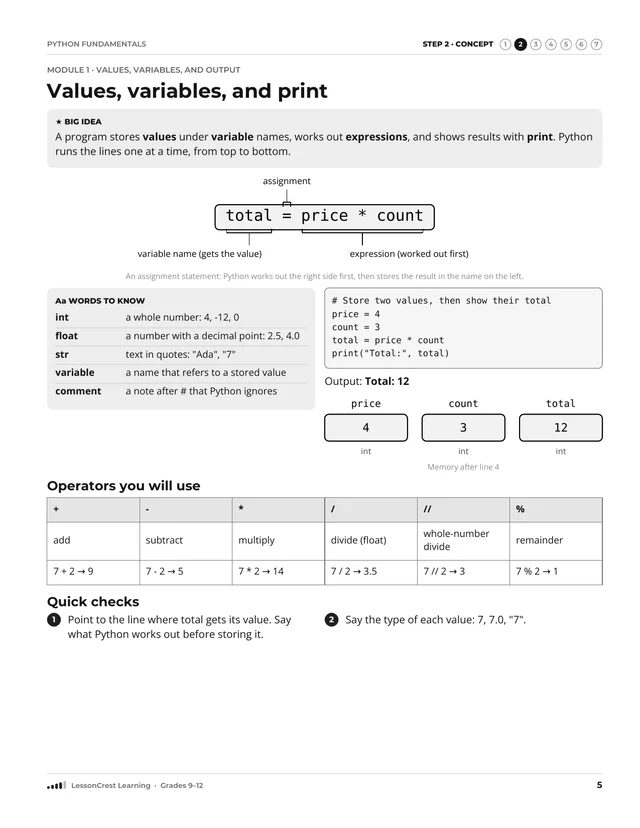
- Values, types, variables, and print
- Comparisons and if / elif / else
- for and while loops, lists, and indexes
- Functions, return values, and assert tests
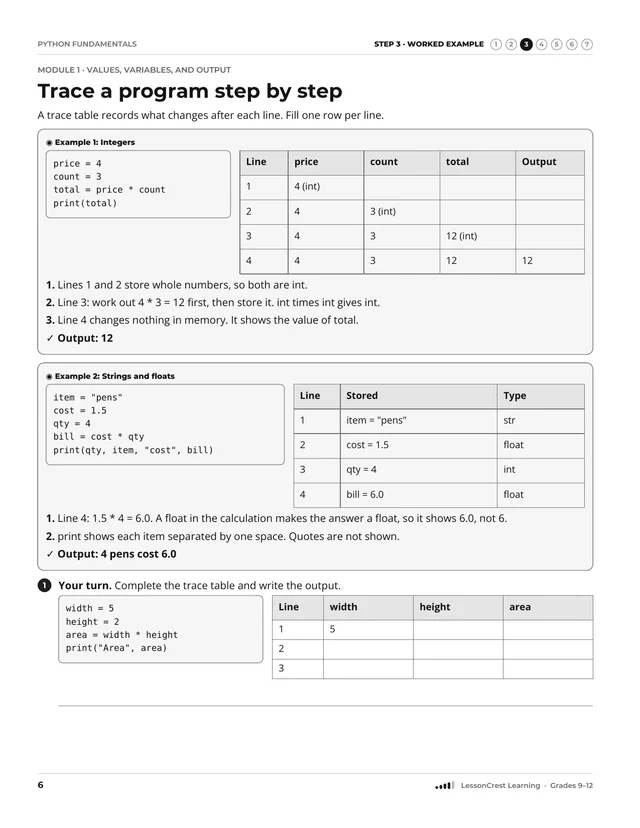
- Trace tables and a repeatable way to fix bugs
Not covered
- Files, classes, and installed libraries
- Graphics, games, and web programs
Before you start, you should be able to
- Follow a list of steps in order
- Use +, -, × and ÷ with whole numbers
- Decide whether a comparison such as 4 < 7 is true
- Read short English-like instructions
Things to have
- A pencil and this book: every task can be done on paper
- For Run tasks: a computer with Python 3.10 or newer and a plain editor such as IDLE
- Written for Python 3.10 or newer; examples checked with Python 3.11, 3.12 and 3.13 in October 2026
Notice
Pictures in this book are simplified learning models. Check answers with the explanations at the back of the book.
Check the skills you need before you begin. If something feels tricky, an adult can help you start in the right place.
Read a short, clear explanation of the new idea and the words that go with it.
Watch the idea being used, one step at a time, in a worked example.
Practice with prompts and help cues. The help gets smaller as you get stronger.
Practice on your own with different kinds of questions, and explain your thinking.
Look back at earlier learning so it stays strong, then check where to go next.
Check your answers. Each answer explains why, names a common mistake, and shows how to fix it.
Loops, Conditions, and Debugging